
GCB CardControl6.0.12 - App Store
You'll be able to see results in few seconds.
Publisher Description


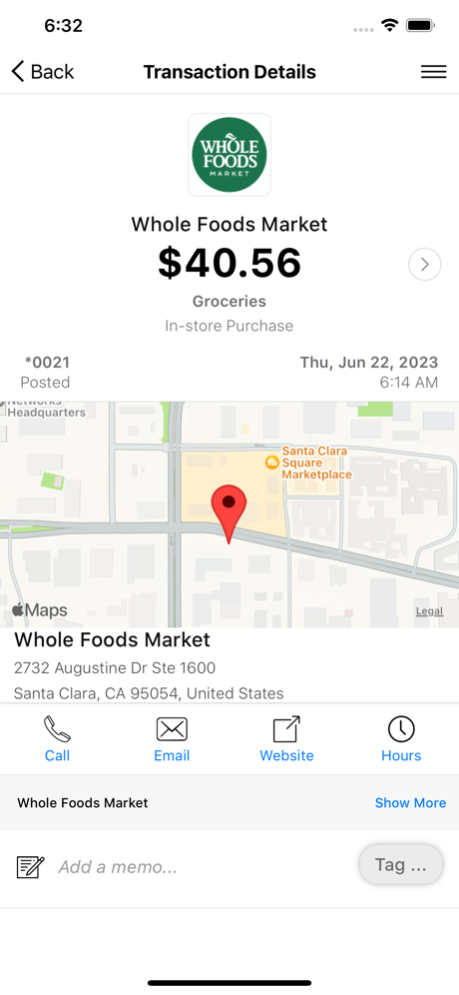

CardControl helps you protect your debit and credit cards by sending you transaction alerts and giving you the ability to define when, where and how your cards are used. Simply download the CardControl app to your smartphone, then customize your alert preferences and usage settings to monitor and manage your cards.
Alerts Ensure Safe, Secure Card Usage
Alerts for PIN and signature transactions can be set up to keep you informed of your debit and credit card usage and help you quickly detect unauthorized or fraudulent activity. CardControl can send an alert when a card is used or when a card transaction has been attempted but is declined – and additional customizable alert options are available. Alerts are sent in real time, immediately after a transaction has taken place.
Location-Based Alerts and Controls
The My Location control can restrict transactions to merchants located within a certain range of your location (using your phone’s GPS); transactions requested outside of the specified range can be declined. The My Region control uses city, state, country or zip code on an expandable interactive map; transactions requested by merchants outside of a specific region can be declined.
Usage Alerts and Controls
Spending limits can be established to allow transactions up to a certain dollar value and decline transactions when amounts exceed your defined thresholds. Transactions can be monitored and managed for specific merchant categories such as gas stations, department stores, restaurants entertainment, travel, and groceries. And your transactions can also be monitored for specific transaction types: in-store purchases, e-commerce transactions, mail/phone orders and ATM transactions.
Card On/Off Setting
When the card is “on,” transactions are allowed in accordance with your usage settings. When the card is “off,” no purchases or withdrawals are approved until the card is subsequently turned back “on.” This control can be used to disable a lost or stolen card, prevent fraudulent activity in the case of a data breach, or control spending.
Additional Capabilities
CardControl also lets you to conduct card-related mobile transactions wherever you are, any time of the day. Supported transactions include:
• Real-time balance inquiries
• Locating ATMs
Key Benefits
• All cardholders can receive alerts to monitor transactions and protect their accounts
• You can actively manage your money and take charge of your card usage
• Parents can remotely control and monitor their children’s spending
• Businesses can ensure spending policy compliance
May 7, 2024
Version 6.0.12
Minor bug fixes and securities enhancement.
About GCB CardControl
The company that develops GCB CardControl is Gulf Coast Bank and Trust Company. The latest version released by its developer is 6.0.12.
To install GCB CardControl on your iOS device, just click the green Continue To App button above to start the installation process. The app is listed on our website since 2024-05-07 and was downloaded 0 times. We have already checked if the download link is safe, however for your own protection we recommend that you scan the downloaded app with your antivirus. Your antivirus may detect the GCB CardControl as malware if the download link is broken.
How to install GCB CardControl on your iOS device:
- Click on the Continue To App button on our website. This will redirect you to the App Store.
- Once the GCB CardControl is shown in the iTunes listing of your iOS device, you can start its download and installation. Tap on the GET button to the right of the app to start downloading it.
- If you are not logged-in the iOS appstore app, you'll be prompted for your your Apple ID and/or password.
- After GCB CardControl is downloaded, you'll see an INSTALL button to the right. Tap on it to start the actual installation of the iOS app.
- Once installation is finished you can tap on the OPEN button to start it. Its icon will also be added to your device home screen.
Program Details
System requirements
Download information
Pricing
Version History
version 6.0.12
posted on 2024-05-07
May 7, 2024
Version 6.0.12
Minor bug fixes and securities enhancement.
version 6.0.11
posted on 2024-04-30
Apr 30, 2024
Version 6.0.11
Minor bug fixes and securities enhancement.
version 6.0.6
posted on 2023-07-20
Jul 20, 2023
Version 6.0.6
This update will provide minor enhancements to both the user interface and user experience as well as increased security enhancements.
Disclaimer
Official App Store Link
We do not host GCB CardControl on our servers. We did not scan it for viruses, adware, spyware or other type of malware. This app is hosted by Apple and passed their terms and conditions to be listed there. We recommend caution when installing it.
The App Store link for GCB CardControl is provided to you by apps112.com without any warranties, representations or guarantees of any kind, so access it at your own risk.
If you have questions regarding this particular app contact the publisher directly. For questions about the functionalities of apps112.com contact us.
